
The AutoConfirm Appointments feature (accessed via More > Marketing & Reminders > Reminders > Appt. AutoConfirm) sends system-generated and automated SMS (text) messages to clients reminding them of their scheduled appointments.
To enable AutoConfirm Appointments, toggle on the Enable AutoConfirm setting.
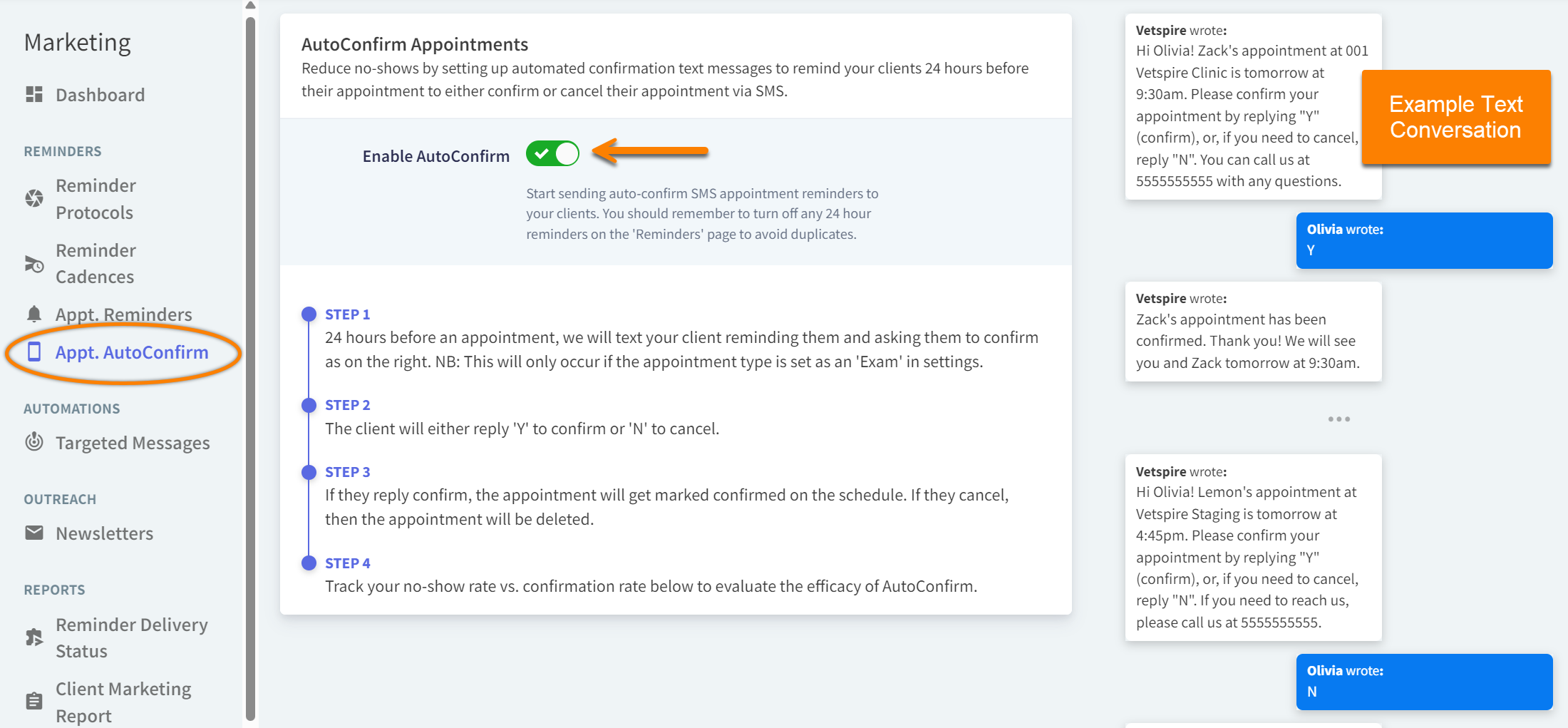
For Exam Appointment Types Only
Automatic confirmation texts are sent only for Exam appointment types. Exam appointment types are configured in More > Admin > Appointment Types when Is Exam is set to Yes.
How It Works
When AutoConfirm Appointments is enabled, clients receive a text message 24 hours before their upcoming appointment start time. They can reply “Y” to confirm the appointment or “N” to cancel.
-
When a client responds with “Y,” the system updates their appointment status from Planned to Confirmed.
-
When a client responds with “N,” their appointment is removed from the Schedule calendar and recorded in the Appointment Deletion Log in the Canceled status.
-
If the client does not respond at all, their appointment remains in the Planned status unless manually edited.
-
If the client does not respond within 23 hours, a second text message is sent to prompt the client to contact your practice directly to confirm or cancel the appointment.
-
If the client replies to the text with an unrecognized response (other than “Y” or “N”), a second message is sent prompting them to contact your practice to confirm or cancel their appointment.
AutoConfirm Appointment texts are recorded in Patient Chart > Messages.
Automated confirmation text messages cannot be customized.
The AutoConfirm Appointment text messages are system-generated and cannot be customized per location. The system uses a standard phone number for all communications from organizations using Vetspire.
What happens when a client has multiple appointments scheduled at the same time but at different locations?
When AutoConfirm Appointments is enabled for your organization, and a client has two appointments scheduled for the same time at two different locations, the system behavior is as follows:
-
The client will receive one text message with the options to confirm or cancel the appointments.
-
If the client responds with “N” to cancel, both appointments are canceled.
How do AutoConfirm texts work with Client Communication Preferences?
AutoConfirm Appointment texts are SMS Transactional messages. Clients must have their communication preference for SMS Transactional messages set to YES to receive AutoConfirm texts.