
In Financials > Reporting, several customizable reports give you insights into sales, invoice payments, coupons and discounts, commissions, credits, and more. You can also use Financials reports to track new client and patient activity, protocol reminders, scheduled appointments, and other forms of revenue generation.
Each Financials report can be filtered by date range and other key fields. You can also add Breakdowns to each report to view granular detail of each data point included in the report.
All reports can be emailed and downloaded as Excel files.
Available Reports
-
Sales: The total amount of Due invoices dated within the selected date range. This report does not include sales tax but does include any applied discounts.
-
Payments: The total amount received from clients by any payment method within the selected date range.
-
Sales Tax: The total amount of tax added to finalized invoices within the selected date range.
-
Discounts: The total amount of discounts (coupons, plan discounts, order discounts, and line-item discounts) applied to finalized invoices within the selected date range.
-
Protocol Reminders: The total number of protocol reminder messages sent within the selected date range.
-
Other Reports: Reports on revenue, tax, payments, and other financial insights with pre-configured breakdowns.
-
Coupons Report: Total coupon usage across your organization within the selected date range.
Additional Financials Reports
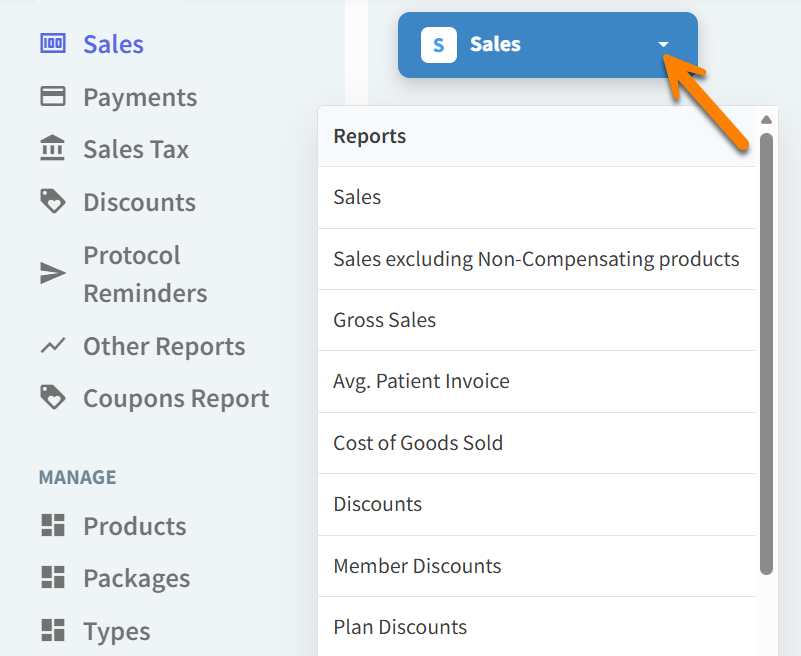
From any Financials report, select the blue report title to open a drop-down menu of all available reports.
-
Sales Excluding Non-Compensating Products: This report is the same as the Sales report but does not include any products that have the setting ‘Non-compensated?’ set to Yes.
-
Gross Sales: The total amount of Due invoices dated within the selected date range excluding sales tax and discounts.
-
Average Patient Invoice: The total sales amount of the selected date range divided by the number of unique patients on each invoice. (Example: One invoice with two patients is counted as two unique invoices in this report.)
-
Cost of Goods Sold: The total cost to the organization of products sold within the selected date range.
-
Member Discounts: The total amount of wellness plan or membership discounts applied to finalized invoices within the selected date range.
-
Plan Discounts: The total amount of wellness plan discounts applied to finalized invoices within the selected date range.
-
Sales Commissions: Total commissions earned by providers based on product sales within the selected date range.
-
Tips: The total amount of tips received during the selected date range (when the ‘Display field to enter a tip amount upon checkout’ preference is enabled for your organization).
-
Donations: The total amount of donations received during the selected date range (when the ‘Display field to enter a donation amount upon checkout’ preference is enabled for your organization).
-
Dispense Fees: The total amount of dispense fees added to invoices within the selected date range (for products that have dispense fees included in the pricing settings).
-
Taxable Sales: The total amount of finalized invoices that include taxable items (dated within the selected date range).
-
Paid Sales: The total amount of invoices in the Paid status (dated within the selected date range).
-
Sales Before Plan Discounts: This report is the same as the Sales report but does not include sales tax or wellness plan discounts. Other discount types are included in this report.
-
Account Credits: The total amount of client account credits manually added and automatically added via credited order items within the selected date range.
-
Goodwill Credits: The total amount of client account credits manually added within the selected date range.
-
Plan Enrollments: The total monetary value of wellness plan enrollments within the selected date range.
-
Gross Average Patient Invoice: The total sales amount (excluding sales tax and discounts) of the selected date range divided by the number of unique patients on each invoice. (Example: One invoice with two patients is counted as two unique invoices in this report.)
-
Deferred Revenue: The total amount of deferred revenue from unused items in wellness plans within the selected date range.
-
Uncollectibles: The total amount of finalized invoices marked as Uncollectible within the selected date range.
-
New Clients: The total number of new client profiles created within the selected date range.
-
# Patient Invoices: The total number of Paid invoices dated within the selected date range.
-
Unique Patients: The total number of new patient profiles created within the selected date range.
-
Unique Clients: The total number of new client profiles created within the selected date range.
-
Appointments: The total number of scheduled appointments that were not updated to the No Show status within the selected date range.