
To refund an account credit that has been applied to an invoice (such as for a deposit), you must void the account credit payment before the balance can be refunded to the client:
-
Locate the invoice record in the Invoices table in Patient Chart > Billing, then select the row to open the invoice.
-
Scroll down to the Payments Towards this Invoice table.
-
Locate the payment applied via the account credit. Select the ellipsis to open the action menu, then select Void Payment.
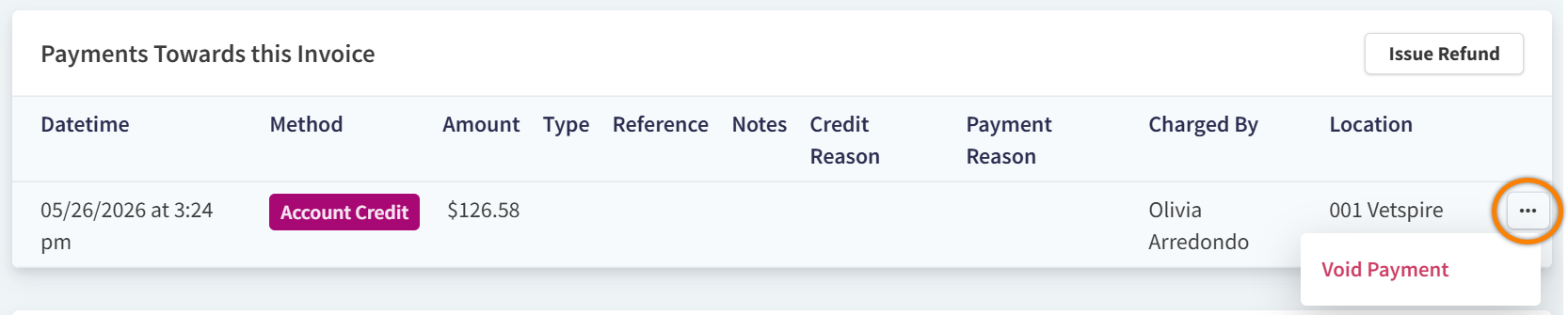
This returns the account credit balance to the client’s account and updates the invoice status to Due.
-
In Patient Chart > Billing, select Refund next to the Credit on Account balance.

-
In the Refund Credit window, select the payment you want to refund.
-
Enter the Amount to Refund (less than or equal to the payment amount).
-
Select Record Refund!
When the payment was originally collected using an integrated payment processor (such as Vetspire Pay), this button is labeled Issue Refund. Selecting this button both records the refund in Vetspire and returns the refund amount to the client’s payment method.