When managing your product stock counts in More > Inventory & Services > Manage > Inventory Counts, you can add lot numbers and expiration dates to vaccine/immunization products. When this information is saved to the product details for the immunization:
-
The Lot Number automatically populates in the New Immunization window when ordering the immunization in an encounter.
-
The Lot/Batch Number and Expiration Date automatically populate on downloaded rabies certificates.
To add the lot number and expiration date for an immunization:
-
Go to More > Inventory & Services > Manage > Inventory Counts.
-
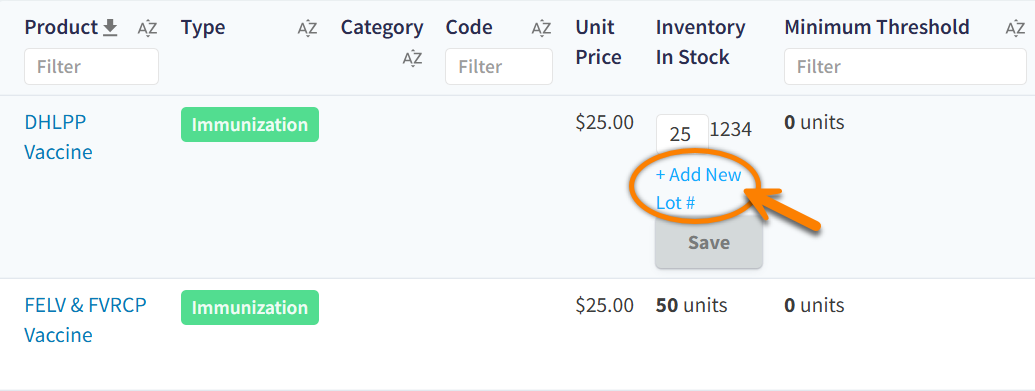
Locate the product you want to edit in the table, then select the value in the Inventory In Stock column.
-
Select + Add New Lot # to open the Adjust Inventory window.
-
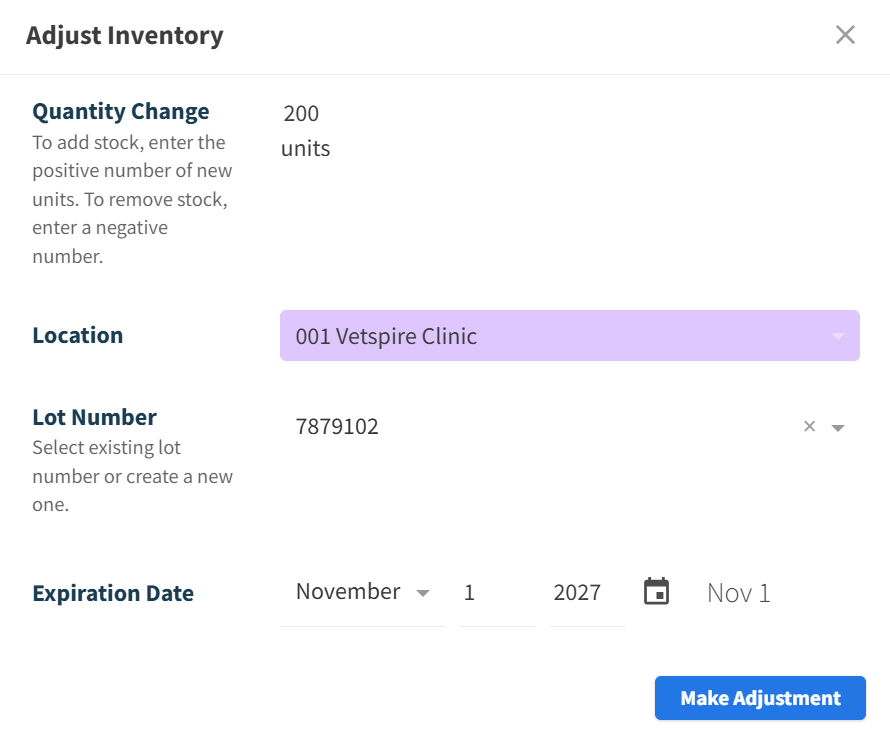
Enter the Quantity Change (the quantity received), Lot Number, and Expiration Date. You can enter a new Lot Number or select an existing one.
-
The Location will default to the location currently selected in Global Navigation. You can change this selection as needed.
-
Select Make Adjustment.